🌍 Proudly serving clients worldwideBook a Free Strategy Call →
+91 700 226 6993 Schedule a Call
Admin Console + Mobile App Case Study

Two-Wheeler Finance Management Platform

An end-to-end operations panel and customer app for a secondhand two-wheeler loan business

BoroTech Solution designed and built a two-sided platform for a secondhand two-wheeler financing business: an internal Operations Console for the finance team, and a customer-facing mobile app so every borrower can track their own loan — covering the full lifecycle from application intake through disbursal, EMI collection and reporting.

Discuss a Similar Project
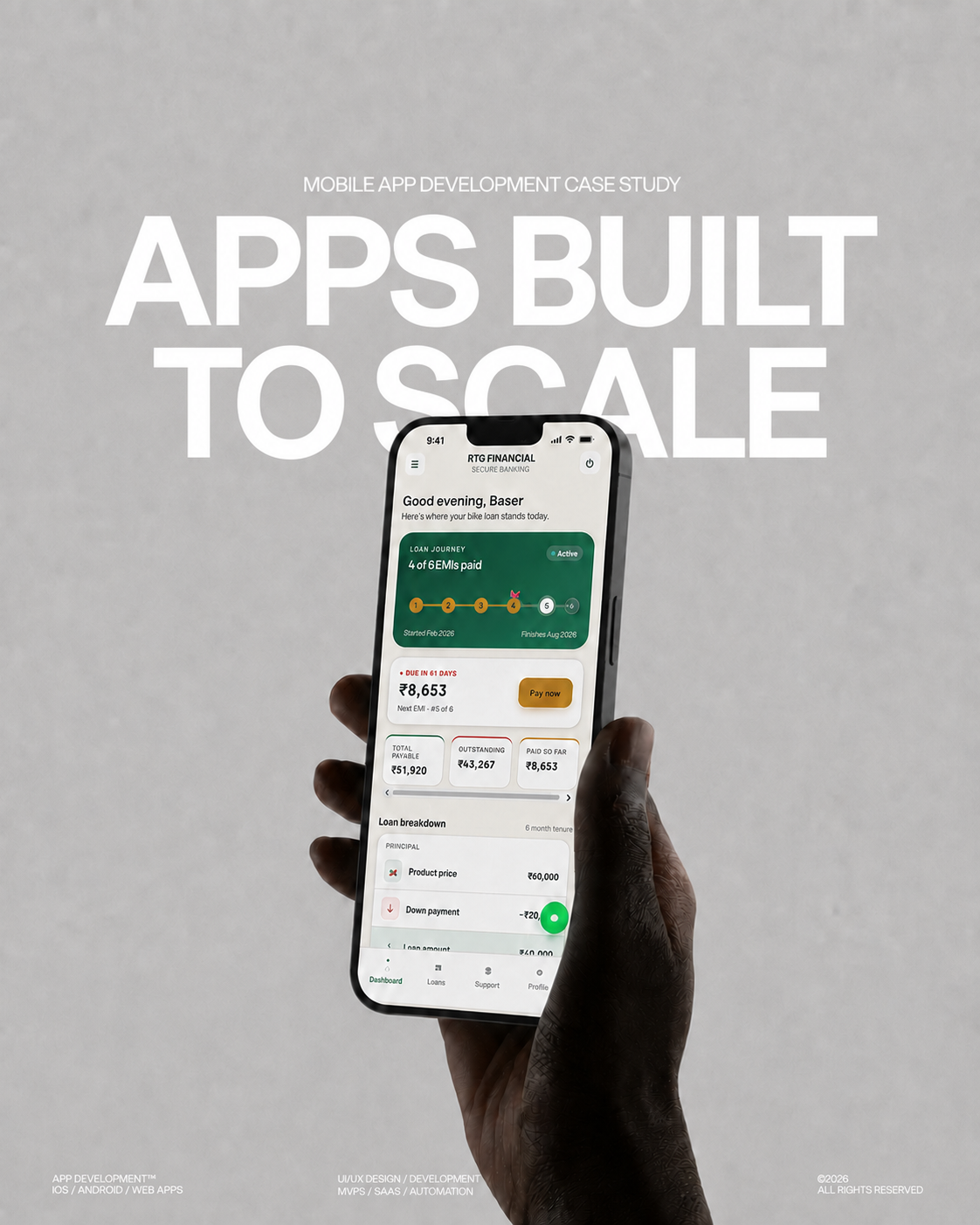
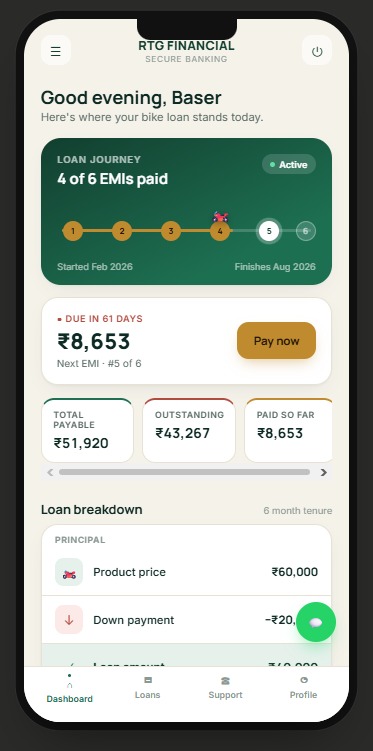
Two-Wheeler Finance customer app — loan journey tracker and EMI dashboard
Full Console
Admin Web Platform
6-Step
Application Wizard
3
Payment Channels
2-Sided
Admin + Customer App
Executive Summary

Replacing Registers, Spreadsheets and Phone Calls With One Connected System

The client runs a financing business built around secondhand two-wheelers — motorcycles and scooters purchased on installment plans through local showrooms. Businesses like this typically start out managing loan files, EMI collection and customer follow-ups manually — across registers, spreadsheets and phone calls — which makes it hard to see the true state of the loan book at any given moment or give customers visibility into what they owe.

We designed and built a two-sided platform for this business: an internal Operations Console for the finance team, and a customer-facing mobile app so every borrower can track their own loan. Together they cover the full loan lifecycle — application intake, guarantor and showroom verification, disbursal, EMI scheduling, multi-channel payment collection, verification, and portfolio reporting.

The Business

Financing Used Two-Wheelers Through Local Showrooms

The client sources used motorcycles and scooters, partners with local showrooms and guarantors, and finances the purchase for the end customer over a fixed tenure — typically a short window of a few months with a down payment, monthly EMIs, processing fee, and applicable charges and GST. Vehicles, showrooms and guarantors are all recorded against each loan file, since repossession and recovery in this business depend on knowing exactly who holds the vehicle and who vouched for the customer.

The Challenge

Five Gaps Every Unconnected Lending Business Runs Into

Without a connected system, a lending business like this typically runs into the same set of gaps.

01

Fragmented Visibility

No single, live view of how much is out on loan, how much has been collected, and how much is still outstanding.

02

Manual, Error-Prone Collections

Cash, bank transfer and QR collections have to be manually reconciled against the correct loan and EMI number, with no built-in audit trail of who confirmed the payment.

03

Slow, Inconsistent Onboarding

Onboarding a customer means re-keying the same details — personal, vehicle, guarantor, showroom, loan terms — across separate paper or spreadsheet records.

04

No Customer Self-Service

Borrowers have no way to check their EMI schedule, dues, or payment history without calling the office.

05

No Staff Accountability

Branch or field staff have no controlled way to work inside the system, and there's no record of who approved or edited what.

The Solution

One Connected System, Two Front Ends, One Source of Truth

We delivered a single connected system with two front ends sharing one source of truth for every loan.

Admin Operations Console

A web-based console for the finance and operations team to create loan applications, review and approve them, verify payments, and monitor the whole portfolio.

Customer Loan App

A mobile app that gives each borrower a live view of their own loan — EMI schedule, dues, vehicle and guarantor details, and a one-tap way to pay.

Both are built on the same loan, customer and payment records, so an EMI confirmed in the console updates the customer's app instantly, and a payment initiated by the customer shows up in the admin's verification queue.

Admin Operations Console

Organised Around the Day-to-Day Rhythm of a Lending Desk

The console is organised around the day-to-day rhythm of a lending desk: bring in new applications, move them through approval, activate the loan, collect and verify EMIs, and report on the book — with dedicated areas for customers, guarantors/showrooms, staff and an activity log for accountability.

Operations Overview Dashboard

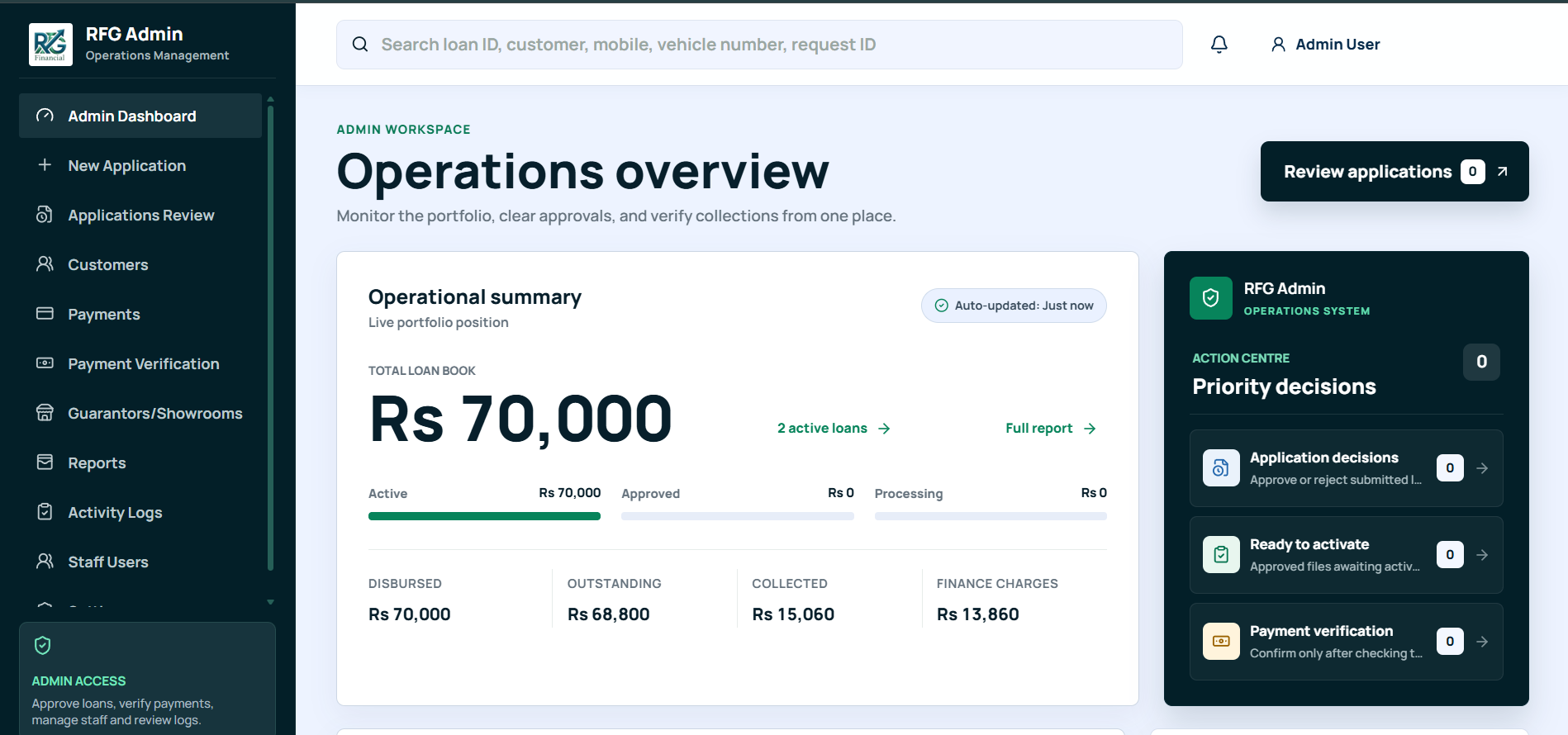
The landing dashboard gives the team a live read on the portfolio the moment they log in: total loan book value, how much of it is active versus approved versus still processing, and the split between disbursed, outstanding, collected and finance-charge amounts. An "Action Centre" panel on the right surfaces exactly what needs a decision right now — pending application decisions, files that are approved and ready to activate, and payments waiting on verification — so nothing sits unattended in a queue.

Admin Operations Console — Operations Overview dashboard with live portfolio position

Operations Overview — live portfolio position and a prioritised action centre for pending decisions

Guided Loan Application Intake

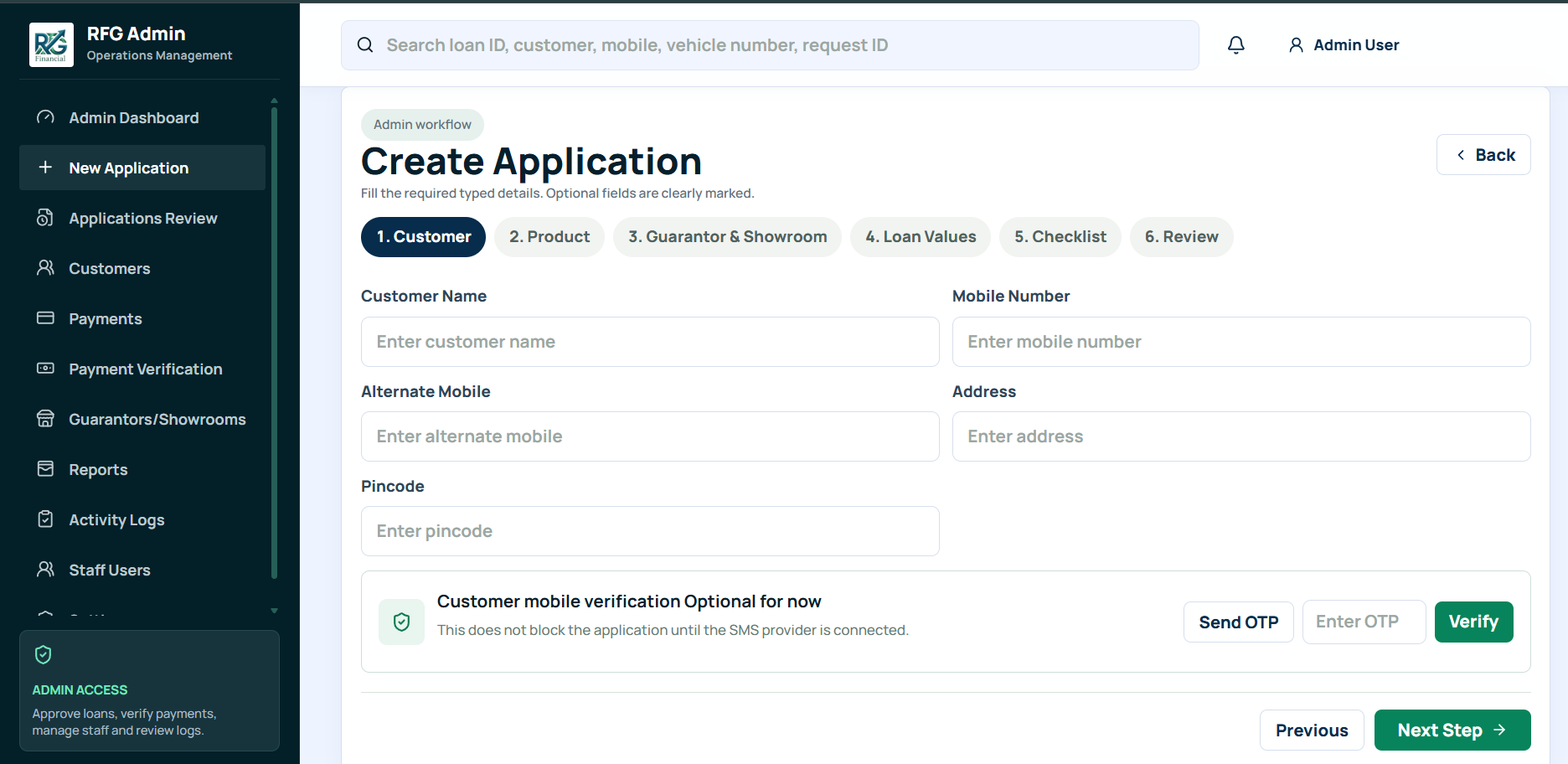
New loans are created through a six-step guided wizard — Customer, Product, Guarantor & Showroom, Loan Values, Checklist, and Review — so every file is captured in the same structure regardless of which staff member opens it. The customer step captures name, mobile, alternate mobile, address and pincode, with optional mobile OTP verification built in so the workflow isn't blocked while a live SMS provider is still being connected. Because the later steps sit in the same flow, every application arrives at the review stage with a consistent, complete file — which is what makes fast approval decisions possible downstream.

Admin Operations Console — six-step Create Application wizard

Create Application — a six-step wizard from customer details through to final review

Payments & Collections Ledger

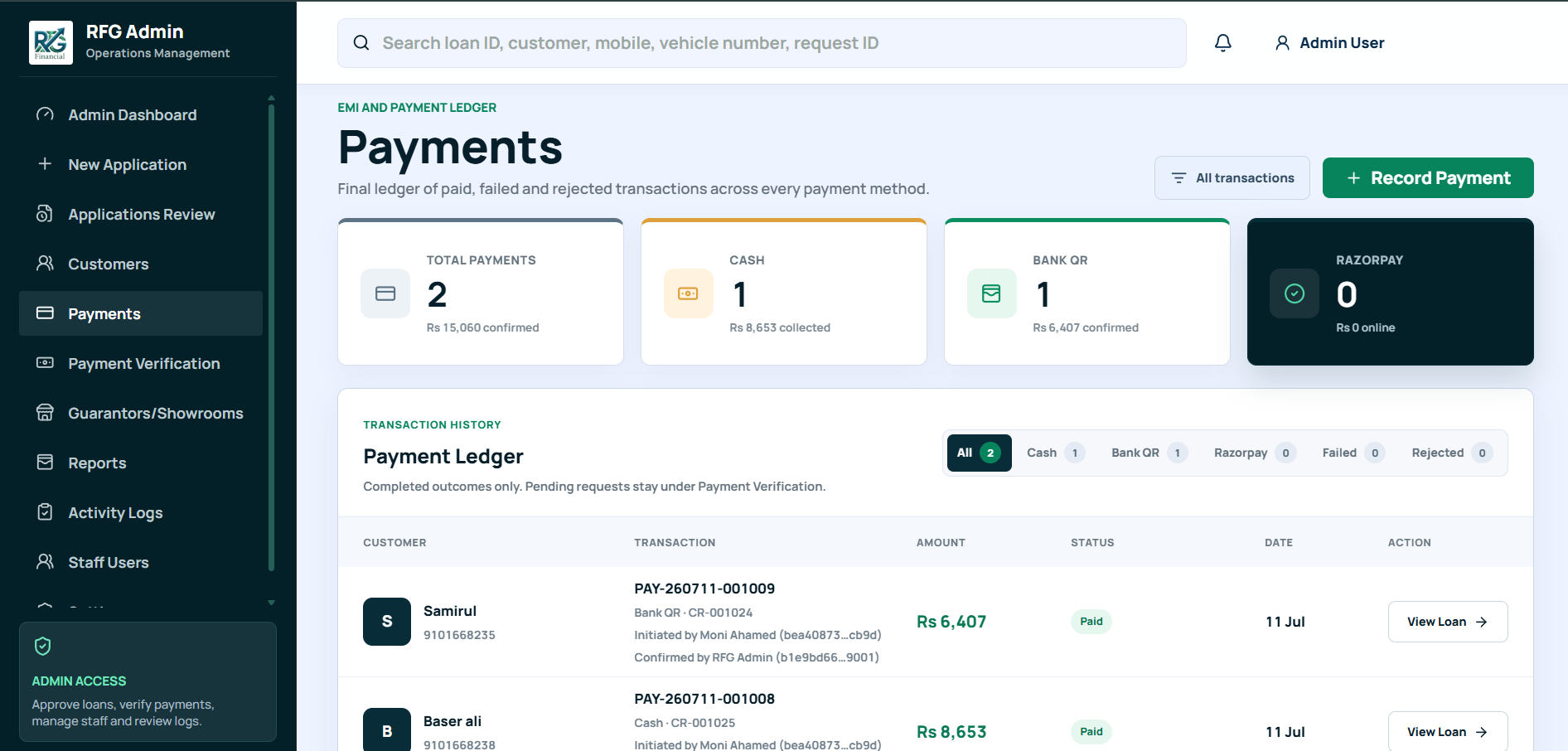
All collected EMIs land in one ledger, tagged by channel — cash, bank QR, or Razorpay for online payments — with running totals for each. Every transaction records who initiated it and who confirmed it (for example, a cash EMI collected by a field staff member and then confirmed by an admin), which gives the business a clear audit trail on money handled outside digital rails. A separate Payment Verification area exists specifically so that cash and QR payments are only counted once an admin has checked and confirmed them — keeping the reported collection figures trustworthy.

Admin Operations Console — Payments ledger with channel-wise totals and audit trail

Payments — a channel-wise ledger of confirmed EMI collections with initiator/confirmer audit trail

Finance Reports & Portfolio Health

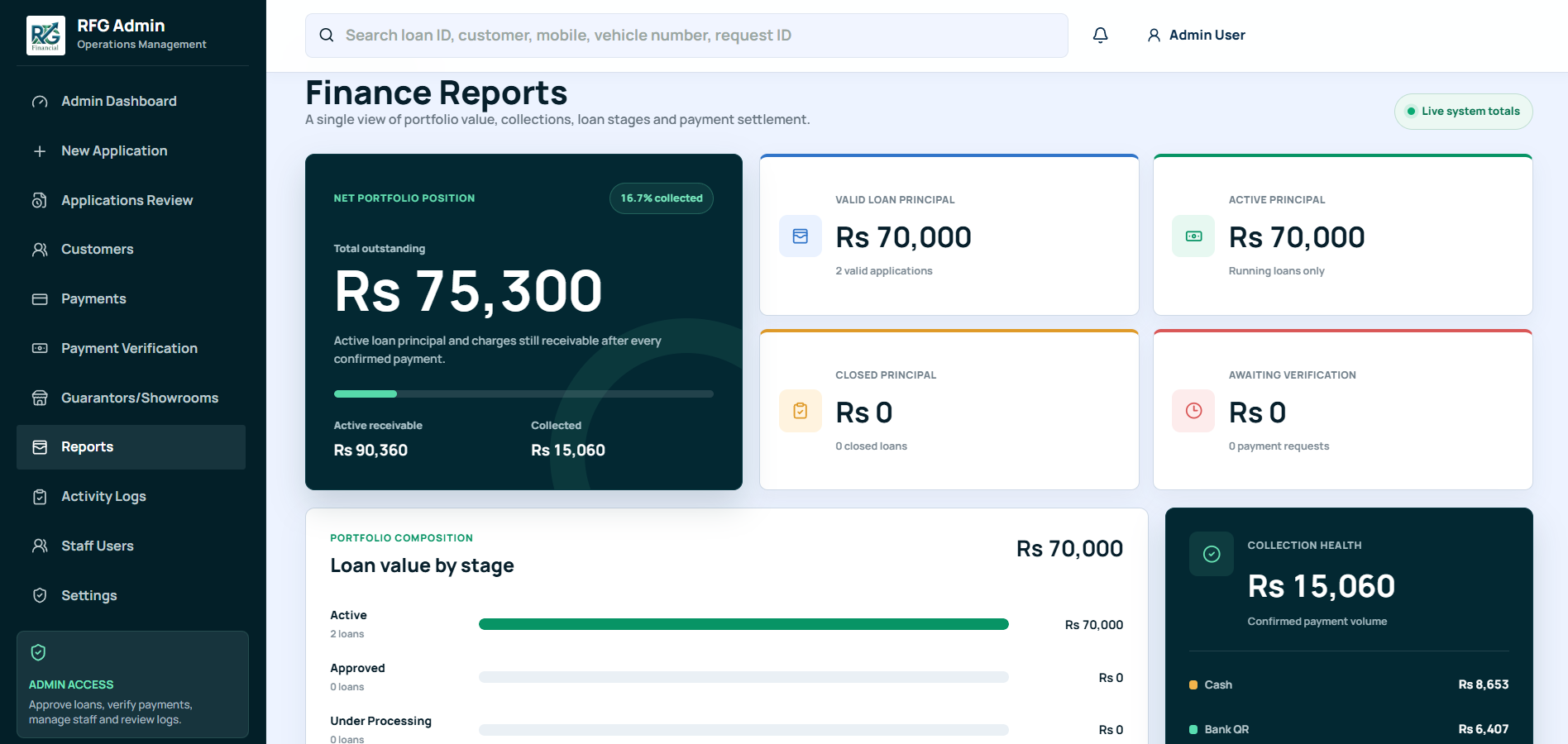
The Reports module rolls everything up into a single financial picture: net portfolio position, valid and active loan principal, closed principal, and amounts still awaiting verification. A portfolio composition view breaks the loan book down by stage (active, approved, under processing), and a collection health panel shows how collected value splits across cash, bank QR and other channels — giving the business owner a real-time answer to "where does the book stand today" without waiting on a manual reconciliation.

Admin Operations Console — Finance Reports with net portfolio position and collection health

Finance Reports — net portfolio position, loan-stage composition and channel-wise collection health

Also Inside the Console

ModuleWhat It Does
Applications ReviewQueue for approving or rejecting submitted loan files before they move to activation.
CustomersCentral record of every borrower, searchable by name, mobile, loan ID or vehicle number.
Guarantors / ShowroomsDirectory of the partner showrooms and guarantors tied to each financed vehicle.
Activity LogsA log of key actions taken across the system, for accountability.
Staff UsersManage the team members who have access to the admin console.
Customer Loan App

A Personal, Secure View of the Loan on Every Borrower's Phone

Every borrower gets a personal, secure view of their loan on their phone — replacing phone calls to the office with a simple dashboard they can check any time.

Personalised Loan Dashboard

On opening the app the customer sees a personal greeting and a visual loan journey — a track of EMI markers showing exactly how many instalments are paid and how many remain against the agreed tenure. Below it, the next due amount, a countdown of days remaining, and a one-tap "Pay now" button; and below that, a quick summary of total payable, outstanding balance and amount paid so far.

Customer Loan App — personalised dashboard with loan journey tracker and Pay now button

Customer Dashboard — loan journey tracker, next EMI due date and a one-tap Pay now

Full Loan Breakdown & Vehicle Record

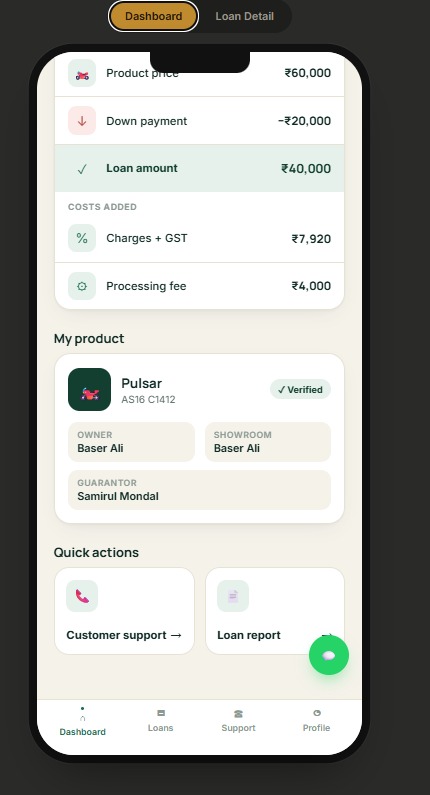
Scrolling down, the customer can see exactly how their loan amount was built up — product price, down payment, resulting loan amount, and the charges/GST and processing fee added on top — so there is never ambiguity about how the EMI figure was reached. The same screen ties the loan to the specific vehicle (make, model and registration), the showroom it was purchased through, and the guarantor on file.

Customer Loan App — loan breakdown with product price, down payment, charges and vehicle record

Loan Breakdown — product price, down payment, charges and processing fee, plus the linked vehicle, showroom and guarantor

Loan Detail — Overview, Installments & Pay

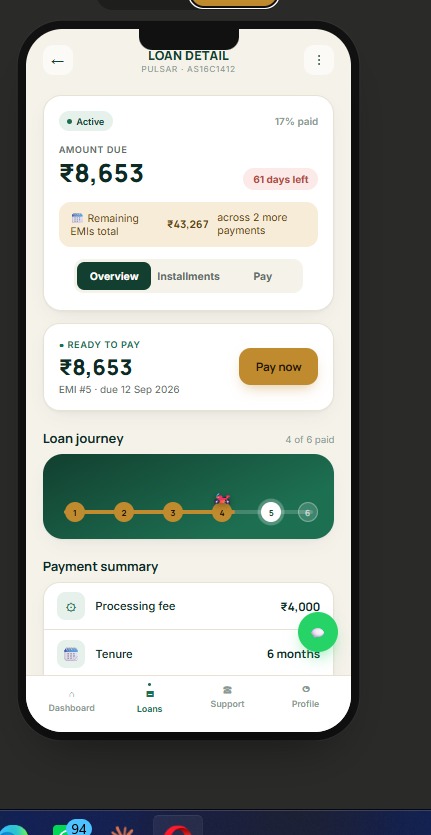
A dedicated Loan Detail screen gives a closer view of a single loan: amount currently due, days remaining, how many EMIs are left and their combined value, and the same visual journey tracker seen on the dashboard. Overview, Installments and Pay are separated into their own tabs so a customer can either check their schedule or jump straight to paying without extra taps.

Customer Loan App — Loan Detail screen with amount due and EMI journey tracker

Loan Detail — amount due, days remaining and the EMI journey tracker for a single loan

Payment Summary & Support

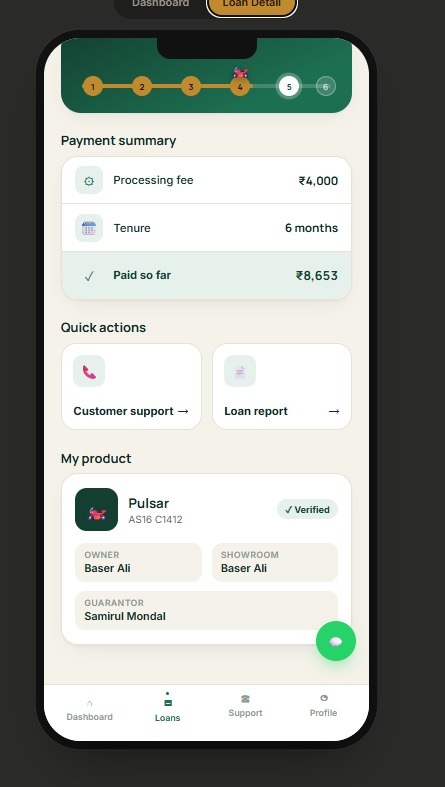
Further down, a payment summary recaps the processing fee, tenure and amount paid to date, and two quick actions give the customer a direct line to customer support and access to a loan report — reducing reliance on phone calls to the office for basic status checks.

Customer Loan App — payment summary with quick actions for support and loan report

Payment Summary — fees, tenure and paid-to-date, plus quick actions for support and the loan report

Impact

A Qualitative Shift in How the Business Operates

The meaningful shift the platform delivers is qualitative: applications are captured once, consistently, instead of being re-keyed across paperwork; every rupee collected in cash or by QR carries an audit trail of who took it and who confirmed it; the finance team can see the full portfolio's stage, collection and outstanding position in one screen instead of reconciling it manually; and borrowers can check their own EMI status and pay directly from the app instead of calling in — freeing the operations team to focus on approvals, verification and recovery rather than status updates.

A note on the figures shown in this case study: screens captured from the live system are used throughout to show the platform in action. The specific figures visible in them — loan amounts, EMI values, collection totals — are test/demo data entered during development, not real client financials, and are not a reflection of business scale.
Technology & Approach

Five Principles Behind the Build

01

Two Front Ends, One Source of Truth

A responsive admin console (desktop-first, for branch and back-office use) paired with a mobile-first customer app, both reading and writing to one shared loan/customer/payment data model.

02

Multi-Channel Payments

Cash, bank QR and Razorpay (online) are all first-class channels in the same ledger, each reconciled through a verification step before it counts toward collections.

03

Guided Workflows

A structured, multi-step application wizard plus a review/approval queue keeps every loan file complete and consistent before money moves.

04

Accountability by Design

Role-based staff accounts and a system-wide activity log so every approval, verification and edit is attributable.

05

Reporting That Stays Current

A portfolio-level reports view (net position, principal by stage, collection health) built directly on live transaction data rather than a periodic manual export.

Conclusion

Built Around How This Business Actually Operates

This project replaced a manual, spreadsheet-and-phone-call operation with a connected system that gives a secondhand two-wheeler finance business a live, trustworthy view of its loan book on one side, and gives its customers a transparent, self-service view of their own loan on the other. The result is a platform built specifically around how this business actually operates — vehicles, showrooms, guarantors, EMIs and cash collections — rather than a generic loan tool bent to fit.

Running a Lending Business on Registers and Phone Calls? Let's Build You a Connected Platform.

BoroTech Solution designs and builds admin consoles paired with customer-facing apps, tailored to how your lending or financing business actually runs.

Chat on WhatsApp